Payroll/Gusto payroll review
I use GustoGusto payroll reviewMakes payroll boring. That’s the point.

Shanin Drucquer, owner of Iconic LandscapingIconic Landscaping · Gusto user since 2024 · Updated September 2026
G2 4.6/5Capterra 4.6/5
4.8my rating$100 Visa gift card after your first payroll, through my referral link.
- Price
- $49 + $6/person
- Setup
- About an hour
- Contract
- Month-to-month
- Support
- Chat, email, phone
If you pay people in the US, Gusto is the payroll I’d choose again. Setup took about an hour. It files my payroll taxes, and the two times the government sent us a letter, Gusto sorted it out. After that, payroll stops being a project.
It’s right for any US business paying W-2 employees or 1099 contractors, whether that’s a crew, a clinic, a law office, or a two-person startup. Skip it if anyone on your payroll works outside the US, or if you’d rather have a sales rep set payroll up for you.

Which plan you need, and what you’ll pay
Prices checked September 2026. Premium is $180 + $22/person, for HR tools most small teams won’t need.
Recommended
Gusto Simple
Simple covers you. Start there and upgrade only when you need to.
- Simple base fee
- $49
- 8 people × $6
- $48
Per month
$97
About $1,164 a year. Health premiums billed separately.
The $100, in three steps
- Sign up through my link. The bonus only tracks if you start from my link.
- Run your first payroll. Add at least one employee, even yourself, and run it. This is the step people skip.
- Get $100. A Visa gift card arrives about 30 days later.
I earn a referral fee when you sign up through my link, at no cost to you. It never changes my rating. How I make money
Have these ready before you start
- Your EIN
- Business bank account and routing number
- State withholding and unemployment account numbers, if you have them
- Each person’s address, SSN, and bank details for direct deposit
Your first payroll, start to finish
Steps 1 and 2 are recreated with example data. Steps 3 and 4 are screenshots from my account.
01
Set it up once, properly
Company details, bank account, state tax accounts, then your people. New hires fill in their own forms. Mine took about an hour.
Maria Lopez
Starts Monday
- Offer letter signedDone
- W-4 and I-9 filled in by MariaDone
- Added to payrollDone
- Direct deposit detailsWaiting on Maria
02
Lock hours by a fixed deadline
Hours, overtime, and bonuses go into one grid. Decide who confirms hours and who approves totals before your first run.
Hours and earnings
Sep 1 – Sep 14
Employee Regular OT Bonus Maria L. 80 6 — James R. 76 0 $100 Ana P. 64 4 — Totals 220 10 $100 03
Submit, and the tax forms file themselves
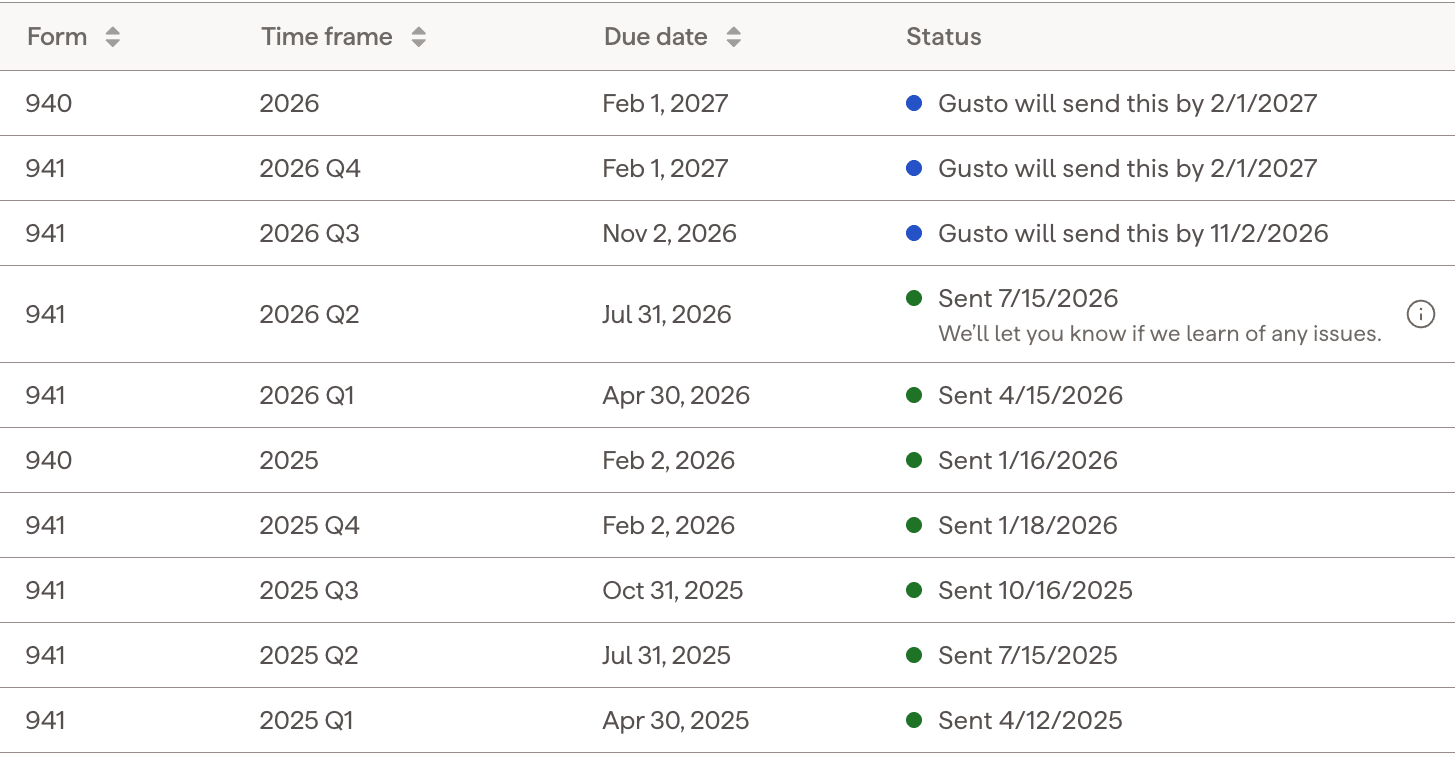
One screen shows the total, the withdrawal, and payday. After that, Gusto files every quarterly and annual federal form. This is my real filing history.
Form Period Status 941 2026 Q3 Scheduled for 11/2/2026 941 2026 Q2 Sent 7/15/2026 941 2026 Q1 Sent 4/15/2026 940 2025 Sent 1/16/2026 941 2025 Q4 Sent 1/18/2026 941 2025 Q3 Sent 10/16/2025 My account. Every Form 941 sent before its due date, and the next ones already scheduled. 04
When a tax notice shows up
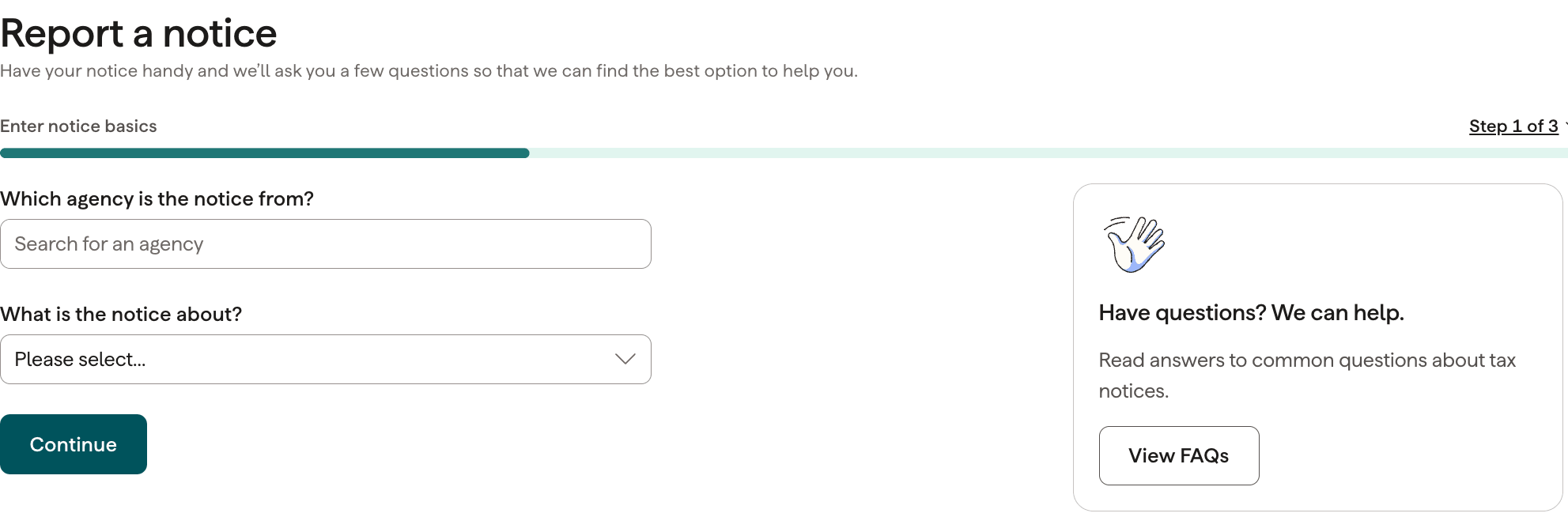
We’ve had two. One was an employee with the wrong address on file; Gusto worked with me by phone until it was sorted. The other was my wrong filing frequency. I uploaded the letter here, they confirmed it was already paid, and it was closed within a week.
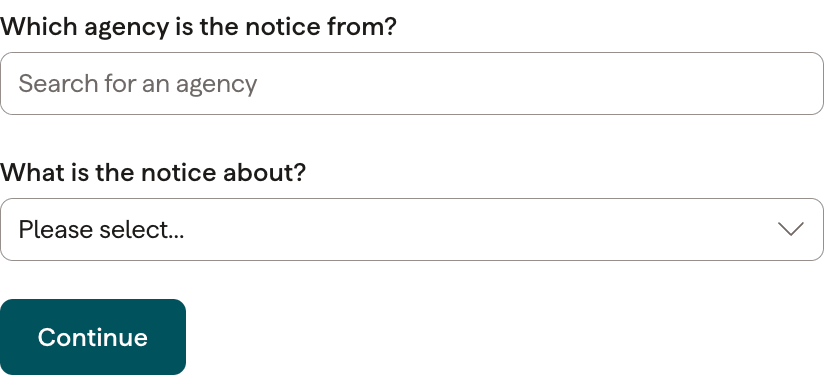
My account. Pick the agency and the notice type, and Gusto’s team takes it from there.
What bugs me, and what I do about it
It keeps pushing its HR and benefits add-ons.
I click “not now.” Payroll works exactly the same without them.
It pitches Gusto Money to your employees.
Tell your team it’s optional before their first payday.
Time tracking and multi-state payroll need Plus.
Plus is $80 + $12/person. If you track hours elsewhere and pay in one state, Simple is enough.
It only covers people working in the US.
Use Deel for anyone abroad and keep Gusto for everyone else.
If Gusto isn’t for you
| Payroll | Best for | Price | Setup | Link |
|---|---|---|---|---|
| Gusto | Most US small businesses | $49 + $6/person | Yourself, about an hour | My pick · 4.8 |
| OnPay | Multi-state teams on a budget | $49/mo + $6/person | Yourself | onpay.com ↗ |
| ADP Run | 50+ people who want HR help | Quote only | Through a sales rep | adp.com ↗ |
| Paychex Flex | Owners who want it done for them | Quote only | Through a sales rep | paychex.com ↗ |
| Deel | Anyone working outside the US | Per international hire | Yourself | deel.com ↗ |
Gusto
My pick · 4.8
Most US small businesses
$49 + $6/person · Yourself, about an hour
OnPay
Multi-state teams on a budget
$49/mo + $6/person · Yourself
ADP Run
50+ people who want HR help
Quote only · Through a sales rep
Paychex Flex
Owners who want it done for them
Quote only · Through a sales rep
Deel
Anyone working outside the US
Per international hire · Yourself
Common questions
Is Gusto a legitimate payroll company?
Yes. Gusto is a US payroll company that says it serves more than 500,000 businesses. Once you sign Form 8655 during setup, it files and pays your payroll taxes as your authorized reporting agent. I’ve run my payroll on it since 2024.
How does Gusto payroll work?
You add your team and they fill in their own tax and bank details. Each pay period you enter hours, review the totals, and submit. Gusto withdraws net pay and taxes from your bank, pays your team on payday, and files the tax forms.
Is Gusto or ADP cheaper?
It depends on your quote. ADP says its small business payroll starts at $39 a month plus $5 per employee, but RUN plans are priced by quote. Gusto lists every price publicly: Simple is $49 + $6/person.
What are the downsides of Gusto payroll?
For me: steady upsells for HR and benefits add-ons, a push to get employees onto Gusto’s money account, and a full per-person fee even for part-timers. Next-day pay costs extra on Simple, and multi-state payroll needs Plus.
How long does Gusto payroll take?
New accounts start on 4-day direct deposit, so you submit four business days before payday. Two-day pay unlocks after 15 days and one successful payroll, and next-day pay is included on Plus and Premium.
Is Gusto good for small businesses?
Yes. Gusto is built for small teams, including ones running their first payroll. Setup is straightforward, and the recurring payroll run is reliable once it’s configured.
Does Gusto handle weekly payroll?
Yes. You can run weekly, biweekly, or monthly schedules, and weekly pay works well once setup is done and your hours come in on a fixed deadline.
Is Gusto expensive for small teams?
Simple is $49 + $6/person, billed monthly. That’s more than the barest tools, but it includes tax filing, which is the part that’s expensive to get wrong.
What happens if a tax notice arrives?
You report it inside Gusto under Taxes & compliance. Gusto’s team works out whether it’s something they handled, and in my two cases they resolved it.
Can I switch to Gusto from my current provider?
Yes. Gusto imports prior payroll history as part of setup. Switch at the start of a quarter if you can, so your quarterly filings stay in one system.

Two years in, payroll is the part of my business I think about least. That’s the best thing I can say about any software.
Shanin Drucquer · last checked September 2026
Gusto · from $49/mo
$100 after your first payroll